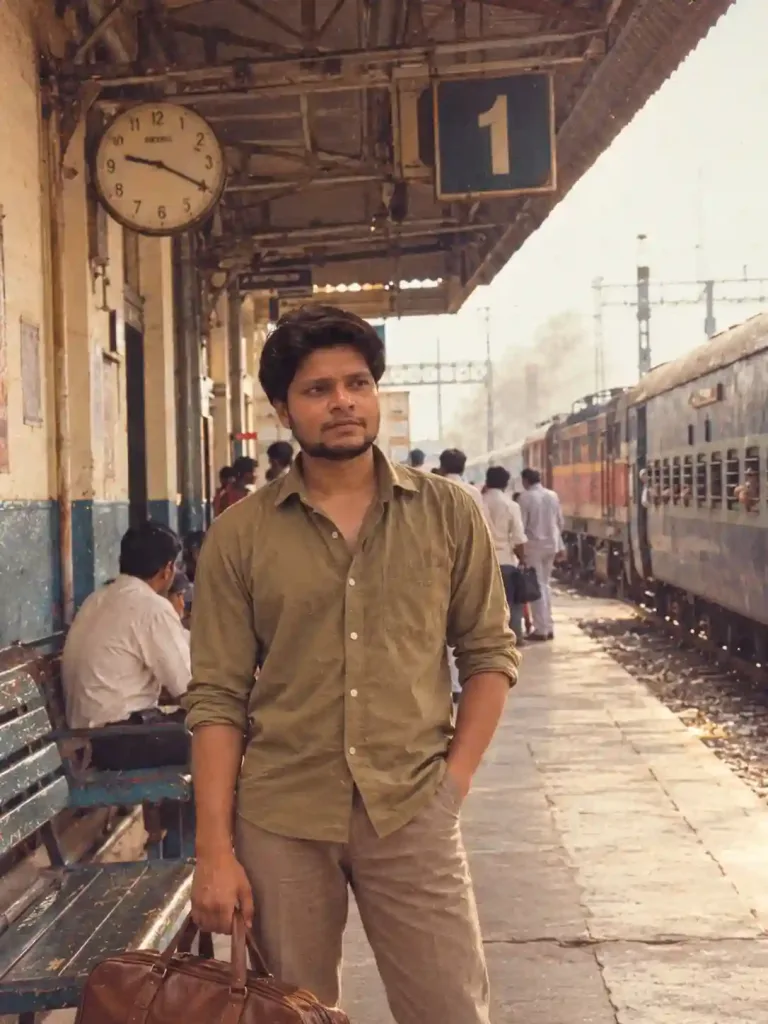

AI Photo Enhancement Prompt – Enhance Image Quality Without Changing Your Face
Enhance blurry, noisy, or low-quality photos with AI while preserving your original face, identity, natural skin texture, colors, and background. Get a cleaner, sharper, professional-looking photograph without artificial beauty filters.
Aesthetic Photo Prompts
Beginner
Prompt
Copied 6 times
Enhance the uploaded photograph into a high-quality, professional, ultra-realistic image while preserving the original person, identity, facial features, composition, and natural appearance. 1. Strict Identity Preservation Preserve the exact identity of every person in the original photo. Do not change facial structure, eyes, eyebrows, nose, lips, jawline, skin tone, age, hairstyle, facial hair, or natural expressions. Do not beautify, reshape, regenerate, or artificially perfect faces. Keep the original pose, body proportions, clothing, accessories, and other identifying details unchanged. 2. Image Quality Enhancement Improve sharpness, clarity, resolution, and fine details naturally. Reduce image noise, grain, compression artifacts, and unwanted blur without making the image look artificial. Recover realistic details in hair, skin, clothing, and the surrounding environment. Correct exposure, white balance, highlights, shadows, and contrast for a balanced, professional result. 3. Natural Colors and Lighting Use realistic, balanced colors with accurate skin tones. Improve lighting gently while retaining the original atmosphere. Avoid oversaturation, excessive HDR, harsh contrast, artificial glow, or dramatic color grading. Preserve natural shadows, realistic light falloff, and the original color character of the photograph. 4. Skin and Texture Preserve natural skin texture, pores, fine lines, and authentic facial details. Remove only distracting temporary noise or minor image artifacts. Do not apply beauty filters, plastic skin smoothing, excessive retouching, or fake skin texture. 5. Background and Composition Preserve the original background, location, objects, perspective, framing, and camera angle. Do not replace, invent, remove, or rearrange anything in the scene. Correct minor lens distortion or alignment issues only when necessary and without changing the composition. 6. Professional Photography Finish Make the image look as though it was captured with a high-quality professional camera and lens. Achieve natural detail, clean tonal transitions, balanced dynamic range, and realistic depth. Keep the result elegant, crisp, visually pleasing, and photorealistic—not AI-generated-looking. STRICT NEGATIVE INSTRUCTIONS No face swapping, identity changes, facial reconstruction, altered expressions, artificial skin, beauty filters, enlarged eyes, reshaped nose or lips, changed jawline, altered skin tone, fake details, excessive sharpening, oversaturation, excessive HDR, halos, cartoon effects, painterly effects, artificial bokeh, background replacement, added objects, or unwanted cropping. FINAL INSTRUCTION: Enhance the existing photograph rather than recreate it. Make only the improvements necessary to increase image quality. When enhancement conflicts with identity preservation, preserving the original identity takes absolute priority. The final image must remain recognizably the exact same photograph, with the same people and scene, only cleaner, sharper, better balanced, and more professionally finished.
Try it in:
Save this prompt
Sign in with Google to keep your favourite prompts in one place — they will be waiting for you on any device.
You do not need an account to copy this prompt — only to save it.
Settings
- Style:
- photorealistic
Works with
- DALL·E 3
- Adobe Firefly
- Google Imagen
- ChatGPT
- Google Gemini
- Claude
A tool not listed here has not been tested with this prompt — it is not a claim that the prompt fails there.
How to use this prompt
How to Use This Prompt
- Open ChatGPT or another AI image editor that supports photo editing.
- Upload the original photograph you want to enhance.
- Copy the complete prompt and paste it into the chat.
- If your tool supports a separate negative prompt field, paste the negative prompt there. Otherwise, append it to your main instructions.
- Ask the AI to edit the uploaded photograph, not create a new one.
- Review the result and check that the face, background, and original details remain unchanged.
Pro tip: If the face changes, retry with: "Preserve the original face and make only conservative adjustments to sharpness, exposure, noise, and color. Do not regenerate facial features."
Results depend on the image editor and the quality of the original photograph.
Tags
Related prompts
Cinematic Office Lobby Portrait – Candid Film Photography Midjourney Prompt

AI Paper Cut Art Prompt - Transform Your Photo into a 3D Layered Papercraft Illustration

Luxury Men's Portrait Prompt – Black Outfit & Crimson Red Background

Profile Photo Prompt for ChatGPT | Prompt for LinkedIn Profile Picture

Prompt for Professional Photo for Linkedin | Prompt for LinkedIn Profile
Ultra-Realistic Jailer 2 Cinema Hall Portrait AI Photo Prompt for Boys

3D Photo Frame Cutout Prompt for ChatGPT | Editorial Photo Edit

Minimalist Paper Illustration Poster Photo Editing Promp for ChatGPT
